
How to Use the All-in-One Case Converter Tool (Simple Guide)
If you’ve ever needed to quickly change text into UPPERCASE, camelCase, PascalCase, snake_case, or any other style, the All-in-One Case Converter from FancyTexty.com makes the job incredibly simple. This tool is designed for writers, developers, students, and anyone who wants fast and accurate text formatting without installing anything. Everything happens instantly in your browser in just paste, click, and copy.
In this short guide, you’ll learn exactly how to use the tool, what each section does, and how the different case buttons help you format your text in seconds.
1. Enter or Paste Your Text in the Input Box
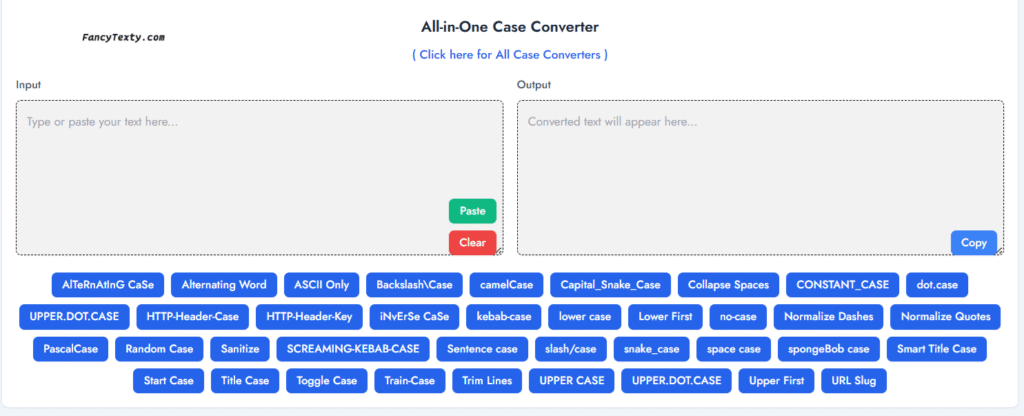
At the top left, you’ll see a large box labeled Input.
This is where your original text goes.
You can do any of the following:
- Type your text manually
- Paste text using the green “Paste” button
- Clear everything instantly using the red “Clear” button
The input box supports long paragraphs, sentences, code, titles, and even entire documents. No matter how large the text is, the converter handles it smoothly.
2. Choose a Case Style From the List of Buttons
Below the input box, you’ll see a clean grid of blue buttons.
Each button represents a different case style, such as:
- UPPER CASE
- lower case
- camelCase
- PascalCase
- snake_case
- kebab-case
- dot.case
- CONSTANT_CASE
- Title Case
- Sentence case
- iNvErSe CaSe
- spongebob case
- Alternating Word
- Normalize Quotes
- Collapse Spaces
and many more.
Just click any button, and the tool automatically converts the text based on your chosen style. There’s no waiting, loading, or refreshing. The output appears instantly.
| Case Style / Description | Example Input | Example Output |
| UPPER CASE – All letters uppercase | Hello World | HELLO WORLD |
| lower case – All letters lowercase | Hello World | hello world |
| Sentence Case – First letter of each sentence capitalized | hello. world! | Hello. World! |
| Title Case – First letter of each word capitalized | hello world | Hello World |
| camelCase – First word lowercase, others capitalized | hello world example | helloWorldExample |
| PascalCase – All words capitalized | hello world example | HelloWorldExample |
| snake_case – Lowercase with underscores | hello world example | hello_world_example |
| kebab-case – Lowercase with hyphens | hello world example | hello-world-example |
| dot.case – Lowercase with dots | hello world example | hello.world.example |
| Train-Case – Title case with hyphens | hello world example | Hello-World-Example |
| CONSTANT_CASE – Uppercase with underscores | hello world example | HELLO_WORLD_EXAMPLE |
| AlTeRnAtInG CaSe – Alternates letter case | Hello World | HeLlO WoRlD |
| spongeBob Case – Mocking style (starts lowercase) | Hello World | hElLo WoRlD |
| Inverse Case – Inverts letter case | Hello World | hELLO wORLD |
| Random Case – Randomly capitalized | Hello World | HeLLo WoRlD |
| Alternating Word Case – Alternates case by word | Hello World | hello WORLD |
| Sarcasm Case – Alias of spongebob case | Hello World | hElLo WoRlD |
| Toggle Case – Alias of inverse case | Hello World | hELLO wORLD |
| HTTP-Header-Case – Title case with hyphens | content type | Content-Type |
| SCREAMING-KEBAB-CASE – Uppercase with hyphens | hello world | HELLO-WORLD |
| space case – Lowercase with spaces | Hello World | hello world |
| no-case – Collapses separators to spaces | Hello-World_Example | hello world example |
| Start Case – Every word capitalized | hello world | Hello World |
| Smart Title Case – Keeps small words lowercase | the title of a book | The Title of a Book |
| HTTP-Header-Key – Canonical header naming | content type | Content-Type |
| UPPER.DOT.CASE – Uppercase with dots | hello world | HELLO.WORLD |
| slash/case – Lowercase with forward slashes | hello world | hello/world |
| Backslash\Case – Title case with backslashes | hello world | Hello\World |
| Capital_Snake_Case – Title case with underscores | hello world | Hello_World |
| URL Slug – URL-safe, lowercase with hyphens | Hello World Example! | hello-world-example |
| ASCII Only – Converts accents to ASCII | café résumé | cafe resume |
| Sanitize – WP-safe filename/postname | Hello World_Example! | hello-world_example |
| Upper First – Uppercase first character only | hello world | Hello world |
| Lower First – Lowercase first character only | HELLO WORLD | hELLO WORLD |
| Collapse Spaces – Reduces multiple spaces to one | hello world | hello world |
| Trim Lines – Removes leading/trailing spaces per line | hello world | hello world |
| Normalize Quotes – Converts smart to straight quotes | “Hello” ‘World’ | “Hello” ‘World’ |
| Normalize Dashes – Converts long dashes to hyphens | Hello–World—Example | Hello-World-Example |
3. View the Result in the Output Box
On the right side, you’ll see the Output box.
This box shows the converted version of your text.
The moment you press any case button, the new format appears here. You can redo the conversion as many times as you want by simply clicking another button.
The tool never modifies your original input unless you choose to update it.
4. Copy the Converted Text with One Click
Once you’re happy with the formatted text, click the Copy button in the Output section. The text is instantly copied to your clipboard.
You can now paste it anywhere in documents, emails, websites, coding projects, or social media posts.
5. Tips for Best Use
- Use Title Case for blog titles or headings.
- Use snake_case or kebab-case for programming.
- Use Sentence case for paragraphs or product descriptions.
- Use Normalize Dashes and Normalize Quotes to clean messy text.
- Use spongebob case or Random Case for fun or creative content.
This makes the tool perfect for students, bloggers, editors, copywriters, developers, and content creators.
Final Thoughts
The FancyTexty All-in-One Case Converter is a simple yet powerful tool that saves time and removes the hassle of manually editing text formats. With a clean design, instant conversion, and more than 30+ case styles, it helps you format any text in seconds. Whether you’re preparing code, writing a story, optimizing titles for SEO, or just having fun, this tool is incredibly useful and easy to use.
If you want fast and accurate text transformations, this is the perfect place to start.
FAQs for the All-in-One Case Converter
1. What is the All-in-One Case Converter tool?
The All-in-One Case Converter is an online tool that changes any text into many different styles like UPPERCASE, lowercase, camelCase, snake_case, Title Case, and more with one click.
2. How do I use this case converter?
Type or paste your text into the Input box, then click any case button such as UPPER CASE, camelCase, or snake_case. The converted result will appear instantly in the Output box, ready to copy.
3. Is the All-in-One Case Converter free to use?
Yes, the tool is completely free to use. You do not need to sign up, log in, or install anything. Just open the page, paste your text, and start converting.
4. What kind of users is this tool useful for?
This case converter is helpful for bloggers, students, developers, copywriters, social media managers, and anyone who needs to format text quickly without making manual edits.
5. Can I convert long paragraphs or large blocks of text?
Yes, you can paste large paragraphs, product descriptions, articles, or code snippets. The tool converts long text instantly and keeps the original content structure while changing only the letter case.
6. Is my text saved or stored anywhere?
No, the conversion happens in your browser. The tool does not store or save your text on a server, which makes it safe for sensitive or private content.
Click here for Fancy Texty Generator and All Case Converters
Check here for the Letter Case Wiki.