
Italic Text Generator: Use italic text online to turn your text into the format you need. Paste content, adjust options, then copy clean results for bios, captions, chats, and posts.
An Italic Text Generator converts normal letters into slanted or cursive-style characters. These characters use Unicode symbols. They look like styled text. They copy and paste well on most platforms.
Why does this matter in 2026? Text is crowded. Bold is common. Italic adds a soft emphasis. It feels friendly. It also looks premium in bios, captions, menus, and UI labels.
You can turn simple words into stylish lines in seconds. Type your text. Choose an italic style. Copy the output. Paste it on social, chat, or your website. Your words stand out, yet remain readable.
Here is a quick sample from normal to italic.
Plain: Fancy Texty
Italic (math italic): 𝘍𝘢𝘯𝘤𝘺 𝘛𝘦𝘹𝘵𝘺
Italic (bold italic): 𝙁𝙖𝙣𝙘𝙮 𝙏𝙚𝙭𝙩𝙮
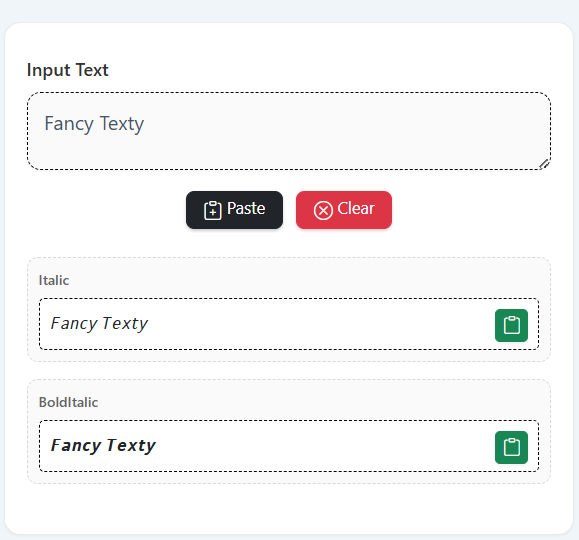
he Italic Text Generator works without design tools. No images. No fonts to install. Just Unicode. It is fast, light, and copy-ready for most apps.
Key Components You Need To Know
- Input box: where you type or paste text.
- Style engine: maps each character to an italic variant.
- Output preview: shows the styled text in real time.
- Copy button: copies the full result to your clipboard.
- Options: bold italic, script italic, monospace italic look-alikes.
- Benefits:
- No design skill needed.
- Works across many platforms.
- Quick updates to bios, captions, and menus.
Best Italic Text Generator Tools And Methods For 2026
There are many generators. Most follow the same flow. The difference is in speed, completeness of the character set, and small filters like case handling or punctuation care.
When you pick an Italic Text Generator, focus on these points.
Does it support A–Z, a–z, and digits? Does it keep punctuation intact? Is the copy button reliable on mobile? Does it sanitize spaces and line breaks? Does it remember your last style?
Method one is the basic web generator. It runs in your browser. It is fast and private for short text. Method two is a lightweight script embedded in your CMS. It helps when you want the feature on your own page. Method three is a desktop or mobile app workflow. It helps with long text and offline work.
Top Recommended Solutions
- Web-Based Generator: Best for social bios, quick captions, and chat. Pros: zero setup, one-click copy. Cons: needs internet and may not store presets.
- Embedded Widget (CMS/Blog): Best for website owners who want on-page styling tools. Pros: brand control, SEO value, and higher dwell time. Cons: needs setup and updates.
- Local Script or App: Best for power users and batch work. Pros: fast, offline, and customizable. Cons: requires basic tech steps and maintenance.
How To Use Italic Text Generator: Complete Guide
This is a simple process. It takes less than a minute for short text.
- Open your preferred Italic Text Generator.
- Type or paste your text into the input box.
- Pick the style: regular italic or bold italic.
- Check the preview. Fix spacing if needed.
- Click Copy. Paste it where you need it.
Step-By-Step Process
- Start With Plain Text: Use short lines to keep it clean.
- Choose A Style: Try 𝘪𝘵𝘢𝘭𝘪𝘤 or 𝙗𝙤𝙡𝙙 𝙞𝙩𝙖𝙡𝙞𝙘.
- Preview Across Apps: Paste it into Notes, WhatsApp, or your CMS.
- Fix Edge Cases: Replace unsupported characters if a platform fails.
- Copy The Final Output: Keep a clean backup in plain text too.
Pro Tips And Best Practices
- Keep lines short for small screens.
- Do not style every word. Use italics for focus.
- Test on Android, iOS, and desktop.
- Mix with bold for headings: Title + italic subline.
Advanced Italic Text Generator Techniques
Want more control? You can add rules to your workflow. For example, auto-capitalize titles before styling. Or remove extra spaces and emojis that break alignment. You can also pre-convert quotes and dashes to straight versions so they map better.
You can generate multiple variants at once. One column for 𝘪𝘵𝘢𝘭𝘪𝘤, one for 𝙗𝙤𝙡𝙙 𝙞𝙩𝙖𝙡𝙞𝙘, and one for 𝘮𝘰𝘯𝘰-𝘪𝘵𝘢𝘭𝘪𝘤 look-alikes. Then, pick the one that fits the tone of your post or page.
For teams, save presets. Example: “Caption Italic, 80 chars max.” Or “Menu Italic, two words only.” This keeps style consistent across posts and screens.
Common Mistakes To Avoid
- Over-styling → Fix: Style only key phrases.
- Very long lines → Fix: Keep to 40–80 characters.
- Unsupported glyphs → Fix: Replace with plain letters.
- Poor contrast in UI → Fix: Pair italics with clear color and size.
Italic Text Generator Applications And Use Cases
You can use an Italic Text Generator in many places. Social bios, pinned tweets, story text, email headings, and portfolio callouts. Product pages can use italic for feature notes. Education apps can show terms in italics. Designers can mock up labels without loading custom fonts.
Short marketing lines work very well. “Limited stock today.” “Ships in 24 hours.” “Now with free returns.” The slant adds urgency without shouting.
Real-World Examples
- Instagram Bio: “Founder at 𝘈𝘱𝘱 𝘓𝘢𝘣 | Building tools for creators.”
- Twitter/X Caption: “Shipping 𝘷1.2 today. Dark theme and faster loads.”
- Product UI: Button helper text: “𝘈𝘤𝘤𝘦𝘴𝘴 𝘴𝘦𝘵𝘵𝘪𝘯𝘨𝘴 are here.”
Examples And Quick Usage Ideas
Below are ready lines you can copy, edit, and use.
- Headline + Subline: Launch Day — 𝘉𝘦𝘵𝘢 𝘪𝘴 𝘭𝘪𝘷𝘦 𝘯𝘰𝘸
- Promo: 𝘍𝘳𝘦𝘦 𝘴𝘩𝘪𝘱𝘱𝘪𝘯𝘨 𝘵𝘰𝘥𝘢𝘺
- Status: 𝘞𝘰𝘳𝘬 𝘪𝘯 𝘱𝘳𝘰𝘨𝘳𝘦𝘴𝘴
- Navigation helper: 𝘔𝘰𝘳𝘦 𝘴𝘦𝘵𝘵𝘪𝘯𝘨𝘴 𝘣𝘦𝘭𝘰𝘸
- Bio tag: 𝘊𝘳𝘦𝘢𝘵𝘰𝘳 • 𝘉𝘶𝘪𝘭𝘥𝘦𝘳 • 𝘛𝘦𝘢𝘮 𝘗𝘭𝘢𝘺𝘦𝘳
Sample conversion (user provided style):
Fancy Texty → 𝘍𝘢𝘯𝘤𝘺 𝘛𝘦𝘹𝘵𝘺, 𝙁𝙖𝙣𝙘𝙮 𝙏𝙚𝙭𝙩𝙮
Simple Workflow Template For Teams
- Create: Write in plain text.
- Style: Run through the Italic Text Generator.
- Review: Check on mobile and desktop.
- Publish: Use sparingly in key spots.
- Measure: Track clicks, time on page, and saves.
Implementation Notes For Website Owners
If you run WordPress or a static site, you can host a lightweight italic converter. Keep the interface clean. One input. Two outputs: regular italic and bold italic. Add one Copy button per output. Add a Clear button for the input. Cache the last text in localStorage for a nicer return visit.
Add a small note on compatibility. Some legacy apps may not support all characters. Provide a “Plain Fallback” link to strip styling fast.
Add schema, compress images, and keep JS minimal. This helps performance and SEO. Your Italic Text Generator page can rank for utility queries and also support your brand.
Measurement And Optimization
Track three things: copy clicks, dwell time, and return visits. If copy clicks are low, place the button closer to the output. If dwell is low, reduce clutter. If return visits are low, add presets and examples.
Use A/B tests. Try “Italic” vs “Bold Italic” as the default. Test a short hint like “Paste on Instagram” near the output. Small lifts compound over time.
Conclusion
The Italic Text Generator is a simple way to add style and clarity. It works with plain text. It uses Unicode. It runs in the browser and fits most workflows. Use it for bios, captions, menus, and UI labels. Keep lines short. Use italics for key phrases only. Test across devices. Add presets if you publish often.
Start with a small list of sample lines. Convert them in seconds. Copy and paste them into your content. Track what works. Then repeat the winners. With a clean flow and light rules, you will ship faster and look sharper in 2026.
Important Links
FAQs
What Is An Italic Text Generator?
An Italic Text Generator turns plain letters into slanted Unicode variants. It is fast. It needs no fonts. It lets you copy and paste the result into most apps with one click.
How Do I Use An Italic Text Generator?
Type your text. Pick the style. Review the preview. Click Copy. Paste it where needed. Keep a plain version as a backup in case a platform blocks some symbols.
Where Can I Use The Output?
Use it in bios, captions, post titles, menu labels, and UI hints. Most social and chat apps support it. Some very old systems may not. Test once before a big launch.
What Styles Are Best: Italic Or Bold Italic?
Use regular italic for soft emphasis. Use bold italic for short tags and callouts. Avoid styling whole paragraphs. Style only key words or key phrases.
Will This Hurt Accessibility?
Styled Unicode can confuse screen readers in rare cases. Keep plain text nearby. Do not style long sentences. Use italics only where emphasis is helpful.
Why Does A Character Sometimes Look Wrong?
Some platforms lack a glyph for a specific character. Replace that character with the plain version. Or pick the other italic set.
Can I Use This In Emails?
Yes, in many email clients. But support varies. Test in your main targets. Keep a plain text fallback for safety.
How Often Should I Use My Focus Keyword?
Use Italic Text Generator naturally in titles, the introduction, and the conclusion. Aim for about 1.0–1.5% of the total words. Do not stuff keywords.
How Do I Track Results?
Watch copy clicks, time on page, and conversions. Use UTM tags on links in bios. For websites, check search rankings for utility queries and branded terms.
How Do I Repurpose The Output?
Turn short lines into social carousels or story cards. Mix one bold title with one italic line. Keep copy tight. Export images under 100KB for speed.
This article is related to Italic fonts, Unicode italic, Bold italic text, Instagram italic, Stylish text, Copy and paste fonts, Social bio styling, Caption ideas, Typography tools, Text converter, Font generator, Fancy text.