
Square Text Generator: Use square text style to turn your text into the format you need. Paste content, adjust options, then copy clean results for bios, captions, chats, and posts.
The Square Text Generator turns plain text into square-style letters. You type once. You get neat, box-like output. You can copy it and use it on social apps, bios, and captions. You can also use it in headers, buttons, and labels. The format is clean and sharp. It stands out in feeds and lists.
Square text looks like block letters. It sits well in tight spaces. It can help scanning and visual rhythm. Many creators like the style because it feels modern. It also matches grid designs and minimalist UIs.
In 2026, short content wins. We read fast. We also scroll fast. The Square Text Generator supports this trend. It makes short words look bold and tidy. It adds visual break lines in long posts. It helps with organization. It looks consistent across many devices.
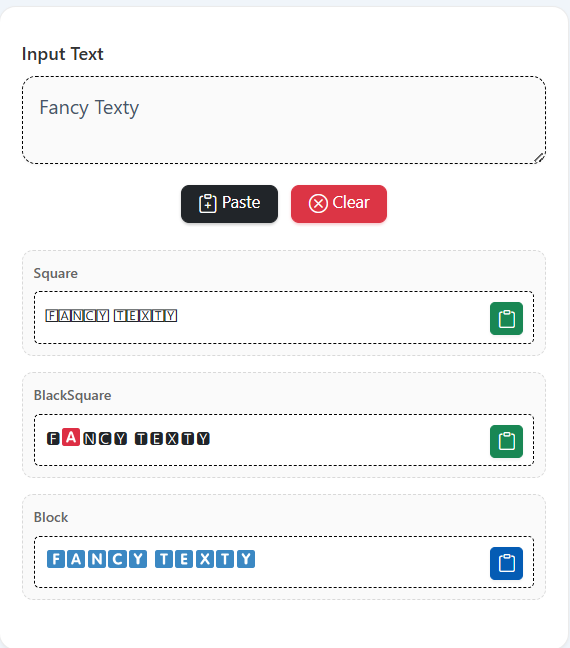
Here is a quick feel for the style.
Plain: Fancy Texty
Square: 🄵🄰🄽🄲🅈 🅃🄴🅇🅃🅈
Square Rounded: 🅵🅽🅲🆈 🆃🅴🆇🆃🆈
Invisible spacer style (for subtle spacing):
You can swap between sets. Pick what fits your tone. Copy and paste anywhere.
Understanding Square Text Fundamentals
The Square Text Generator maps letters to Unicode characters that look square or boxed. These characters are not images. They are text symbols. This means you can copy them to most apps. You do not need a font file to see them in many places. Most modern devices support them.
Key points:
- It uses Unicode characters to mimic square or box shapes.
- The mapping tries to cover A–Z and 0–9 first.
- Some symbols may vary by device or OS.
- Spacing can change by app or screen.
- Not all characters have exact square variants.
Benefits:
- Clean and bold look.
- Good for headings and short labels.
- Fast to copy and paste.
Examples
- “Sale Now” → 🅂🄰🄻🄴 🄽🄾🅆
- “Menu” → 🄼🄴🄽🅄
- “Fancy Texty” → 🄵🄰🄽🄲🅈 🅃🄴🅇🅃🅈 and 🅵🅽🅲🆈 🆃🅴🆇🆃🆈
- Spacer trick: add to pad areas in a caption block.
Best Square Text Tools And Methods For 2026
There are three common paths:
- Simple Web Generators
You paste or type text. The site shows square variations. You click “Copy.” Done. This is fast and friendly. It is great for social kits, comment highlights, and DIY branding. - Browser Extensions or Bookmarklets
These can convert selected text on a page. They are handy if you format headlines often. Speed is the win here. You avoid switching tabs. - Custom Scripts
If you are technical, you can map your own Unicode table. You can build a tiny converter in JS or Python. This is best when you want strict control. You can also add fallbacks for devices with lower support.
What to prioritize
- Coverage: Does the tool handle A–Z, a–z, and digits?
- Copy buttons: One click copy saves time.
- Variants: Offer both box and rounded-square options.
- Fallbacks: Explain what to do if a symbol does not render.
- Performance: It should feel instant.
Top Recommended Solutions
- Method A: Web-Based Generator — Pros: Fast, no install. Cons: Needs internet. Best for social managers and creators.
- Method B: Extension/Bookmarklet — Pros: One-click on any page. Cons: Setup needed. Best for editors and curators.
- Method C: Custom Script — Pros: Full control, offline. Cons: Requires skills. Best for dev teams and brand ops.
How To Use A Square Text Generator: Complete Guide
Follow this simple flow to use Square Text Generator. It works on most tools.
- Open the Square Text Generator.
- Type your text in the input.
- Choose a square style (box or rounded).
- Check the preview.
- Click Copy. Paste into your app.
Quick Benchmarks
- A short phrase should convert instantly.
- The copy action should work in one click.
- The result should paste as text, not an image.
- The output should look similar on phone and desktop.
Pro Tips And Best Practices
- Keep phrases short. The style shines in 1–4 words.
- Test on your target apps. Some apps tweak spacing.
- Use square text for headings, chips, and buttons.
- Mix styles: square for the title, plain for details.
- Add as a thin spacer if needed.
Short Live Examples
- “New Post” → 🄽🄴🅆 🄿🄾🅂🅃
- “Save 20%” → 🅂🄰🅅🄴 20%
- “Fancy Texty” → 🄵🄰🄽🄲🅈 🅃🄴🅇🅃🅈, 🅵🅽🅲🆈 🆃🅴🆇🆃🆈
- Padding: helps separate blocks in bios.
Advanced Square Text Techniques
Square is one style. You can also combine with other families for variety:
- Fraktur: Old gothic look for dramatic headings.
- BoldFraktur: Heavier gothic lines for stronger contrast.
- HandWriting: Casual script vibe for personal notes.
- Double-Struck: Math-style blackboard feel.
- Monospace: Techy, code-like blocks for UI labels.
Workflow idea:
Create a style stack. Use Square for section titles. Use Fraktur for callouts. Use Monospace for CTAs. Keep the body text plain. This keeps clarity while adding visual rhythm.
Automation idea:
If you manage many posts, prepare a small mapping table (A–Z, a–z, 0–9). Run a script that turns selected words into square text. Save time on weekly content.
Common Mistakes To Avoid
- Overuse → Fix: Limit square text to short phrases.
- No testing → Fix: Check rendering on iOS, Android, and web.
- Hard-to-read blocks → Fix: Add spacing or use fewer words.
- No fallback → Fix: When a character is missing, use a plain letter.
- Keyword stuffing → Fix: Keep SEO natural and light.
Square Text Applications And Use Cases
Branding: Use square words in logos, badges, and small banners.
Social Captions: Highlight one key word in square style.
UI Labels: Use square for chips or quick filters.
Docs and Notes: Mark TODO items with a square tag.
Bios and Profiles: Make your role title pop.
Real-World Examples
- Instagram Bio: “Designer” → 🄳🄴🅂🄸🄶🄽🄴🅁
- CTA Button: “Try Now” → 🅃🅁🅈 🄽🄾🅆
- Section Tag: “Tips” → 🅃🄸🄿🅂
Conclusion
The Square Text Generator is a quick win. It turns plain words into bold, box-like text. It helps you grab attention. It fits modern, minimal layouts. It is fast to use and easy to copy.
Use it for short titles, chips, and callouts. Mix it with plain text for balance. Test in your target apps. Keep phrases short. Keep contrast high. If a character fails, switch to a close alternative or plain text.
In 2026, clean visuals win. Square text supports clean design. It is simple, strong, and scannable. Start with a short phrase. Pick the square set you like. Click copy. Paste and publish.
Important Links
- Unicode List: https://en.wikipedia.org/wiki/Unicode
- Fancy Text Generator
FAQs
What is a Square Text Generator?
It is a tool that converts normal letters into square-like symbols. It uses Unicode to show boxy shapes. You can copy the output like normal text. It works in most modern apps.
How do I use a Square Text Generator?
Open the tool. Type your text. Choose a square set. Click copy. Paste where you want. Test the result in your target app.
Where can I use square text?
Use it on social media bios, captions, and comments. Use it in headings, chips, and quick labels. Use it in notes to tag tasks. Keep the phrases short.
Why does some text look different on my phone?
Different devices render some symbols differently. Try the alternate square set. If a letter looks off, replace that character or use plain text.
Can I mix square text with other styles?
Yes. Try Fraktur for drama. Try BoldFraktur for heavier impact. Try HandWriting for a casual note. Keep the body text plain for clarity.
Does square text help with SEO?
Use it mainly for design, not for ranking. Keep your keywords readable in normal text. Use square text in short headings and UI labels.
How do I handle missing characters?
Some characters have no direct square match. Use the closest symbol. If none fits, keep it plain. The message should stay clear.
Are there any accessibility tips?
Do not write long paragraphs in square text. Screen readers may not read them well. Use square text only for short labels or titles. Always keep a plain copy nearby.
Can I automate the conversion?
Yes. Use a browser extension or a small script. Create a mapping table. Convert only the words you need.
Any quick examples I can copy now?
Sure.
Fancy Texty → 🄵🄰🄽🄲🅈 🅃🄴🅇🅃🅈, 🅵🅽🅲🆈 🆃🅴🆇🆃🆈, and spacer for subtle gaps.
New Post → 🄽🄴🅆 🄿🄾🅂🅃
Menu → 🄼🄴🄽🅄
This article is related to Square Text Generator, Square letters, Box text, Rounded square text, Unicode text styles, Copy and paste fonts, Fraktur text, BoldFraktur text, HandWriting style, Double-struck letters, Monospace text, Social media bios, Fancy text tools, Square Text Generator light, Square Text Generator Advanced.