
Mirror Text Generator: Use mirrored text output to turn your text into the format you need. Paste content, adjust options, then copy clean results for bios, captions, chats, and posts.
A Mirror Text Generator flips your text. It shows characters in reverse order. It is fast. It is simple. It helps in social posts, design mockups, puzzles, and memes. It also helps in code demos and UI tests.
Why is it useful in 2026? People scan fast. Short, flipped text stands out. It catches the eye. It can make a title look fresh. It can add a playful twist to a caption. It can also hide spoilers in a line of text.
Where does it fit in your workflow? Use it when you want a quick visual hook. Use it when you need a creative break. Use it to test text direction in RTL-like layouts. Use it to check how a line reads in reverse for copy polish.
Key idea: you type plain text. The Mirror Text Generator outputs reversed text in real time. You press copy. You paste it where you need it.
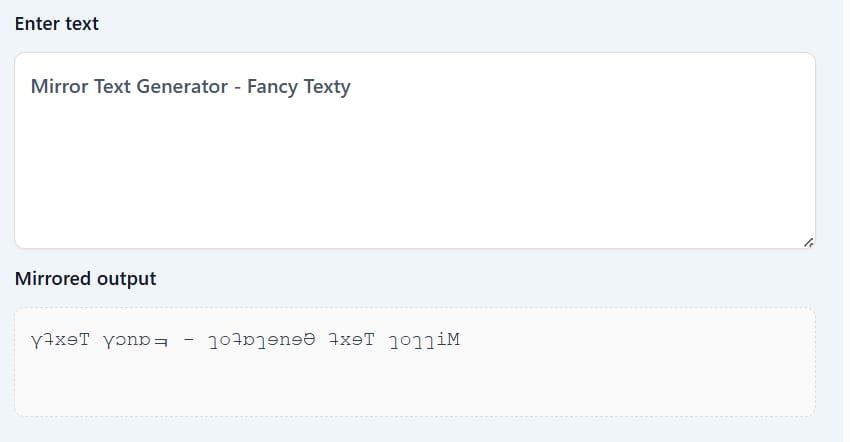
Key Components You Need To Know
- Input box for your normal text.
- Real-time reversed output.
- One-click copy button.
- Clear button to reset the field.
- Optional modes: reverse by words, reverse by characters, or both.
- Benefits:
- Fast and easy.
- No learning curve.
- Works for many use cases.
Best Mirror Text Generator Tools And Methods For 2026
You can build a simple in-page tool with HTML, CSS, and JavaScript. Or you can use an online tool. For most users, an online Mirror Text Generator is enough. It loads fast. It gives instant output. It has a copy button.
What should you look for?
- Accuracy: The reverse must be exact.
- Modes: Reverse by characters, by words, or both.
- Buttons: Copy, paste, and clear.
- Mobile UX: Big targets and simple layout.
- No clutter: Keep ads and popups light.
How to pick the right method:
- If you post on social a lot, use a quick web tool.
- If you build sites, embed a small script.
- If you write long text, pick a tool that handles large inputs.
Top Recommended Solutions
- Method A: Web Tool (Instant)
- Pros: No install, quick, copy button.
- Cons: Needs internet.
- Best for: Social media, quick captions, memes.
- Method B: Local Snippet (JavaScript)
- Pros: Works offline, full control, fast.
- Cons: You must add code.
- Best for: Developers, WordPress blocks, custom tools.
- Method C: Design App Workflow
- Pros: Stay in your design app, keep layout.
- Cons: Manual steps, not real-time in some apps.
- Best for: Static posters, banners, or print-ready files.
How To Use Mirror Text Generator: Complete Guide
This guide is simple. Follow it step by step. You will have mirrored text in seconds.
- Open your Mirror Text Generator page.
- Type or paste your text in the input box.
- Choose mode: reverse characters, reverse words, or both.
- See the live output in the preview.
- Click Copy to copy the mirrored text.
- Paste it into your post, caption, or design.
Step-By-Step Process
- Type a short line, for example:
Welcome to Fancy Texty. - Reverse by characters result:
ytx eT ycnaF ot emocleW→ cleaned spacing →ytxeT ycn aF ot emocleW. - Reverse by words result:
Texty Fancy to Welcome. - Reverse by words and characters result:
ytxeT ycn aF ot emocleW(both effects). - Copy the output with one click.
Examples
Hello→olleHMirror→rorr iM→ cleaned →rorr iM(some fonts add spacing; check your tool)ABCD 1234→4321 DCBAFancy Texty→ytxeT ycn aF
Usage Ideas
- Social hook: Mirror the first or last word only.
- Teasers: Post a mirrored line as a riddle.
- Hidden hints: Hide a key word in reverse.
- Branding: Mirror a part of the slogan for a poster.
- UI test: Check LTR/RTL alignment by reading in reverse.
Pro Tips And Best Practices
- Keep lines short. Mirrored long lines get hard to scan.
- Use clear fonts. Thin fonts can look messy.
- Test on the app where you will post. Some apps trim spaces.
- If spacing looks odd, switch to “reverse by words.”
- Avoid all-caps for long lines; use title case for smoother reading.
Advanced Mirror Text Generator Techniques
Once you master the basics, try more:
- Selective mirroring: Mirror only nouns or only hashtags.
- Pattern mirroring: Mirror the first and last word, keep the middle normal.
- Palindromes: Use the tool to test palindromic lines like
level,racecar, or custom slogans. - With styles: Combine with bold, italic, bubble, or fraktur styles for a standout effect.
- Automation: Add small scripts to auto-copy after output updates.
Measurement
- Track clicks when mirrored words appear in banners.
- Watch dwell time on posts with mirrored hooks.
- Compare CTR of normal vs mirrored headlines.
- Use UTM tags for social tests.
Common Mistakes To Avoid
- Overuse → Fix: Mirror one word, not the whole paragraph.
- Bad spacing → Fix: Trim extra spaces and test on the target app.
- Tiny buttons → Fix: Use large copy and clear buttons.
- No preview → Fix: Always show live output above the fold.
Mirror Text Generator Applications And Use Cases
Marketing: Mirror a key word in a headline to stop the scroll.
Social: Mirror a one-liner punchline.
Education: Use it in puzzles or riddles for class tasks.
Design: Mirror a subtitle in a hero banner or poster.
Product UI: Add it as a fun Easter egg in a text tool.
Real-World Examples
- Instagram Caption: “Find the clue:
elzzup” → Users reply with “puzzle.” - Poster Tagline: “Create.
et aerc” → A bold visual echo. - Tweet Hook: “Decode this:
sniw kciuq” → Leads to a thread with tips.
Sample Copy Blocks
Use these blocks as ready-to-paste snippets.
- Short Hook:
Solve this: sdrawkcab etirw I - Brand Teaser:
Next drop at 9 PM: emit ruoY rorriM - Caption:
Mirror mood today: emit tnerruC
Conclusion
A Mirror Text Generator is simple. It is fast. It gives you a quick way to make lines pop. It is great for social, banners, and fun reveals. Keep lines short. Test spacing. Use a clear copy button. Use mirrored words as light spice, not the whole dish.
Start small. Mirror a single word in your next caption. Track the result. If it boosts clicks or comments, use it again. Keep it playful. Keep it clear. With a clean Mirror Text Generator, you will create fresh visuals in seconds.
Important Links
FAQs
What Is A Mirror Text Generator?
A Mirror Text Generator reverses your text. It can reverse by characters, by words, or both. It is quick and easy. You type, it flips, and you copy.
How Do I Use A Mirror Text Generator?
Open the tool, paste your text, and pick a mode. The output updates at once. Click copy. Paste it into your post, design, or note.
Can I Mirror Only One Word?
Yes. Select the word and mirror it. You can also mirror every word. Or you can mirror the full line. Choose the mode that fits your goal.
Why Does Spacing Look Strange Sometimes?
Some fonts add extra spacing around wide letters. Also, apps may trim spaces. If this happens, try reverse-by-words. Or adjust spacing in your app.
Is It Safe For Long Lines?
It works, but long mirrored lines are hard to read. Keep it short. Mirror key words only. This keeps the effect clean.
Can I Use Mirrored Text On Social Media?
Yes. It works well as a hook. Use it for the first or last word. Test how your audience reacts. Keep it fun.
What Are The Best Modes For Beginners?
Start with reverse by characters for a bold look. Try reverse by words for cleaner spacing. Test both. Pick what reads better in your app.
Does It Work With Numbers And Symbols?
Yes. 1234 becomes 4321. Symbols reverse order too. Always check the final look before posting.
Can I Combine Mirror Text With Other Styles?
Yes. Mix with bold, italic, bubble, or fraktur styles. Keep it readable. Do not overdo it.
How Do I Track Results?
Watch CTR, likes, and replies. Compare mirrored vs normal posts. If mirrored posts perform better, keep using them in small doses.
This article is related to Mirror text, Reverse text, Backwards text, Text tools, Social captions, Wordplay, UI testing, Typography, JavaScript text, Creative posts, Design banners, Meme text.