
Clap-Emoji Text Generator: Insert emojis and symbols; Generate stylish text online. Fast copy, paste, and share for bios, captions, chats, and posts.
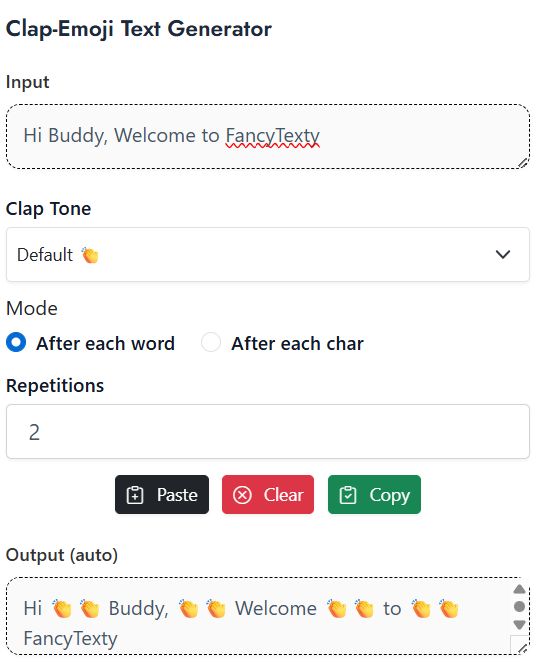
The Clap-Emoji Text Generator turns plain text into clear emphasis. It inserts the 👏 emoji between letters or words. It supports skin tones. It supports repeat counts. It is fast. It is simple. It works well for social posts, captions, comments, and chat.
You can control where the clap goes. You can place a clap after each word. You can place a clap after each character. You can also repeat claps up to ten times. This gives you precise control over tone and punch.
Default tones are ready. 👏 👏🏻 👏🏼 👏🏽 👏🏾 👏🏿 are available. Pick one tone for your brand or audience. Use a light tone for neutral posts. Use a dark tone for better contrast on some themes.
This guide shows clear steps. It uses simple language. It includes ready examples. It also includes short usage tips and FAQs. It follows a proven SEO structure for strong results in 2026.
Understanding Clap-Emoji Text Generator Fundamentals
The Clap-Emoji Text Generator adds emphasis without long edits. It drops a clap at set points. It can be after words. It can be after characters. It can repeat claps up to ten times. It can switch tone in one click.
Why it matters in 2026: attention is short. Clear emphasis helps scanning. Emoji is universal across platforms. It looks good on mobile. It adds rhythm to short lines.
Where it fits: social media, messaging, micro-copy, tooltips, and short CTAs. It is also useful in educational posts. It marks key ideas. It helps call-outs in tutorials, notes, and reminders.
Key Components You Need To Know
- Input box for your plain text.
- Mode switch: After each word / After each char.
- Tone picker: 👏, 👏🏻, 👏🏼, 👏🏽, 👏🏾, 👏🏿.
- Repetitions selector: 1–10 claps.
- Copy button to copy the final string.
- Benefits:
- Faster emphasis with one click.
- Consistent style across posts.
- Easy to tweak for tone and length.
Best Clap-Emoji Text Generator Tools And Methods For 2026
A good Clap-Emoji Text Generator should be simple. It should show input and output side by side. It should support both modes. It should allow all skin tones. It must have a repeat option up to 10.
What to prioritize: clean UI, clear copy, and no clutter. The copy button should be visible. The mode switch should be obvious. The tone list should show all six tones. The repeat control should have safe limits to avoid spam.
How to evaluate: test with short and long sentences. Check output on Android, iOS, and desktop. Paste in your target apps. Try Twitter/X, Instagram, YouTube, WhatsApp, and Discord. Check for line breaks. Make sure the output keeps spaces as expected.
Top Recommended Solutions
- Method A: After Each Word Mode
Pros: clean, readable, natural rhythm.
Cons: less intense than character mode.
Best for: captions, tweets, headlines, and CTA lines. - Method B: After Each Char Mode
Pros: maximum punch and drama.
Cons: can be hard to read in long lines.
Best for: short words, single-word memes, or hype posts. - Method C: Tone-Matched Repetition
Pros: fine control. Soft or strong emphasis.
Cons: too many claps can feel spammy.
Best for: brand-aligned emphasis and short callouts.
How To Use Clap-Emoji Text Generator: Complete Guide
Use this simple flow.
- Type your text in the input box.
- Select a mode: After each word, or After each char.
- Choose an emoji tone: 👏, 👏🏻, 👏🏼, 👏🏽, 👏🏾, or 👏🏿.
- Set repetitions from 1 to 10.
- Click Copy. Paste in your app.
Default Tones Available
👏 👏🏻 👏🏼 👏🏽 👏🏾 👏🏿
Modes
- After each word
- After each char
Repetitions
- 1 to 10 claps per insert
Step-By-Step Process
- Enter plain text:
Make it clear - Pick After each word.
- Choose tone 👏🏽.
- Set repetitions to 2.
- Output:
Make 👏🏽👏🏽 it 👏🏽👏🏽 clear 👏🏽👏🏽
Now try character mode:
- Enter:
WOW - Pick After each char.
- Choose tone 👏.
- Repetitions: 1.
- Output:
W👏O👏W
Try with a sentence:
- Input:
This is great - Mode: After each word
- Tone: 👏🏻
- Repetitions: 1
- Output:
This 👏🏻 is 👏🏻 great 👏🏻
Try with hyphenated terms:
- Input:
Long-term focus - Mode: After each word
- Tone: 👏🏾
- Repetitions: 1
- Output:
Long-term 👏🏾 focus 👏🏾
Try with emojis included:
- Input:
Focus now 🔥 - Mode: After each word
- Tone: 👏🏼
- Repetitions: 3
- Output:
Focus 👏🏼👏🏼👏🏼 now 👏🏼👏🏼👏🏼 🔥 👏🏼👏🏼👏🏼
Pro Tips And Best Practices
- Keep lines short for readability.
- Use word mode for sentences.
- Use char mode for short hype words.
- Limit repeats to 1–3 for most posts.
Advanced Clap-Emoji Text Generator Techniques
You can mix modes in one post. Use word mode for the sentence. Use char mode for one key word. This draws the eye to the keyword.
You can time your tone with your brand. Light skin tones can signal a soft voice. Darker tones can add contrast on light backgrounds. Neutral 👏 works everywhere.
Automate with snippets. Save your favorite settings. Keep a few pre-built phrases like:
Please 👏 read 👏 thisDo 👏 it 👏 nowNew 👏 drop
Measure results. Watch engagement. Track saves, replies, and shares. Compare posts with and without claps. Adjust frequency and repeats.
Common Mistakes To Avoid
- Overuse in long paragraphs → Fix: keep it for short lines.
- Too many repeats → Fix: use 1–3 repeats for clarity.
- Using char mode for long sentences → Fix: switch to word mode.
- Ignoring tone contrast → Fix: test on light and dark themes.
- Forgetting spaces when pasting → Fix: preview before posting.
Clap-Emoji Text Generator Applications And Use Cases
Social media: callouts, hooks, and hype words.
Education: highlight a rule or term.
Marketing: draw focus to CTAs and benefits.
Support: emphasize a warning or next step.
Community: fun prompts and event reminders.
Real-World Examples
- Tweet hook:
Input:Read this first
Word mode, tone 👏, repeat 1
Output:Read 👏 this 👏 first 👏 - CTA line:
Input:Join today
Char mode, tone 👏🏿, repeat 1
Output:J👏o👏i👏n👏 t👏o👏d👏a👏y - Announcement:
Input:New features live
Word mode, tone 👏🏾, repeat 2
Output:New 👏🏾👏🏾 features 👏🏾👏🏾 live 👏🏾👏🏾
Short Usage Cheatsheet
- Default tones: 👏 👏🏻 👏🏼 👏🏽 👏🏾 👏🏿
- Modes: After each word / After each char
- Repetitions: 1–10 (use 1–3 for most posts)
- Best for: hooks, headlines, single-word hype, CTA lines
- Avoid: long bodies, dense paragraphs, excessive repeats
Conclusion
The Clap-Emoji Text Generator helps you add emotion and clarity fast. It can insert claps after words or characters. It supports six tones. It supports repeat counts up to ten. It is simple. It is fast. It works well across platforms.
Start with word mode and one repeat. Add char mode for short hype words. Test the tone on your theme. Keep it readable. Track engagement and refine. With small steps, your posts stand out. Your message becomes clear. Your audience gets the point. Try the Clap-Emoji Text Generator now and level up your next post.
Important Links:
Unicode Emoji List, Fancy Text Generator
FAQs
What Is The Clap-Emoji Text Generator?
It is a tool that adds the 👏 emoji to your text. It places claps after words or after characters. It supports skin tone options. It also supports repeat counts up to ten. It makes emphasis quick and consistent.
How Do The Two Modes Work?
After each word mode inserts a clap after each word. After each char mode inserts a clap after each letter. Word mode is easier to read. Char mode is stronger but works best for short words.
What Skin Tones Can I Use?
You can use 👏, 👏🏻, 👏🏼, 👏🏽, 👏🏾, and 👏🏿. Pick one that fits your brand or design. Neutral 👏 works in most cases. Always check contrast on your background.
How Many Repetitions Are Best?
The tool supports up to 10 repeats. Use 1–3 repeats for most posts. More repeats increase intensity but can hurt readability. Always preview before posting.
Will It Work On All Apps?
It works on major apps like Twitter/X, Instagram, WhatsApp, YouTube, and Discord. Paste the output and verify spacing. Some apps may wrap lines differently. Test important posts first.
Can I Mix Modes In One Post?
Yes. Use word mode for sentences. Use char mode on one keyword. This draws attention without hurting readability.
How Do I Keep It Accessible?
Keep lines short. Avoid overuse. Ensure color contrast around the emoji. Provide a plain text version if needed in formal docs.
Why Do My Spaces Look Wrong After Pasting?
Some apps trim spaces. Re-paste or add a thin space if needed. Always check the preview. Keep outputs short to reduce wrapping issues.
Can I Save My Favorite Settings?
Yes, many tools keep your last settings. You can also save snippets. Store common phrases with tone and repeats preset.
Is There A Limit For Professional Use?
Use it with care in formal contexts. Keep to one line. Use one repeat. Stick with neutral 👏 for a clean look.
This article is related to emoji text tools, clap emoji generator, social media text formatter, emphasis generator, unicode emoji, instagram text styling, discord text styling, whatsapp text tricks, copy and paste fonts, fancy text generator.