
Double Struck Text Generator: Use double struck letters to turn your text into the format you need. Paste content, adjust options, then copy clean results for names, notes, and posts.
The Double Struck Text Generator turns normal text into a bold, math-style look. People also call it blackboard bold or double-lined text. It uses special Unicode characters. It works in most modern apps and browsers. It is great for titles, bios, captions, and UI labels.
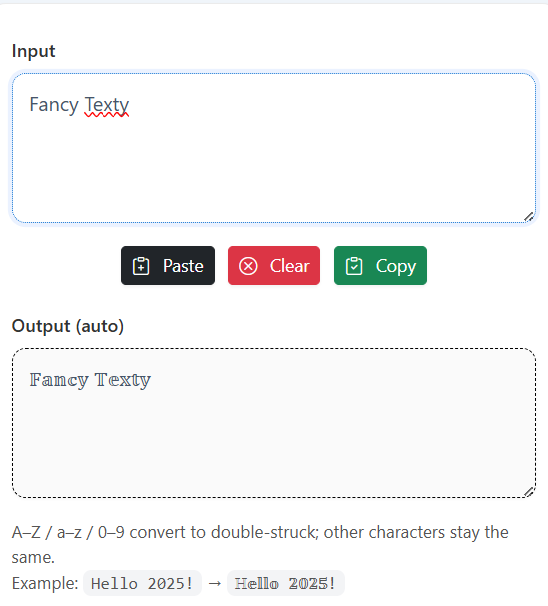
You type plain text. The tool maps each letter to its double-struck version. Then you copy the output and paste it anywhere. It looks fresh and strong. It helps words stand out without images or heavy styles.
Here is a quick sample in this style.
Fancy Texty → 𝔽𝕒𝕟𝕔𝕪 𝕋𝕖𝕩𝕥𝕪
This Double Struck Text Generator guide explains the basics. You will see use cases, simple steps, and best practices. You will also see common issues and fixes. Short examples are included so you can copy fast. The goal is simple. Create clean, eye-catching text for 2026 content with less effort.
Understanding Double Struck Text Generator Fundamentals
Double-struck letters come from math writing. They look like letters with extra lines. In Unicode, these letters live in a special range. Most platforms support them now. Some very old sites may show squares or boxes. But this is rare.
Why this style works:
- It adds contrast.
- It feels premium.
- It is readable on dark and light backgrounds.
Where it fits:
- Social bios and usernames.
- Post titles and intros.
- CTA labels in tools or dashboards.
- Section headers in docs.
- Emphasis in chat or forums.
Key Components You Need To Know
- Input box: You type your plain text here.
- Mapping engine: It converts every character to its double-struck twin.
- Output box: It shows the converted result live.
- Copy button: One tap to copy the styled text.
- Clear/Paste buttons: Reset or paste new text fast.
- Benefits:
- Fast styling without design tools.
- Consistent look across apps.
- Works with letters and digits.
Best Double Struck Text Generator Tools And Methods For 2026
Most online generators follow the same pattern. Some add extra styles like bold, italic, or script. A good tool should be light, quick, and safe. It should not inject ads into the output. It should not change your clipboard without consent.
What to prioritize:
- Live preview: See changes as you type.
- Reliable mapping: All letters A–Z, a–z, and digits 0–9 map correctly.
- Clipboard buttons: Copy and paste with one click.
- Mobile friendly: Input and buttons work on small screens.
- No tracking bloat: Clean code and fast load.
Top Recommended Solutions
- Method A: Pure Unicode Mapping
Pros: Fast, no fonts to load.
Cons: Some legacy apps may not render.
Best for: Social bios, post titles, captions. - Method B: Local Web App With Cache
Pros: Works offline after first load; instant feel.
Cons: Needs proper install prompt or PWA setup.
Best for: Power users and creators who style daily. - Method C: Clipboard-First Minimal Tool
Pros: One screen, fewer clicks, zero fluff.
Cons: Fewer extra styles.
Best for: Quick social updates and chat replies.
How To Use Double Struck Text Generator: Complete Guide
Follow these steps. They are simple and quick.
- Type or paste your plain text into the input box.
- See the double-struck output update live.
- Click Copy to copy the output.
- Paste the text into your app, bio, or editor.
- If the app does not show the style, try another app or export a graphic.
Step-By-Step Process
- Open the tool. Keep it pinned if you style often.
- Enter your text. Example:
Hello World 123. - Confirm the mapping. Check the output for each letter and number.
- Use the copy button. It should copy only the styled text.
- Paste and test. Paste in Instagram, X, Discord, or your CMS.
- Adjust length. Keep lines short for better mobile fit.
- Save presets. Keep a small list of your favorite phrases.
Pro Tips And Best Practices
- Keep lines short. It looks cleaner on phones.
- Use for headings and highlights. Avoid long paragraphs.
- Mix with normal text for contrast.
- Test on your main apps. Some apps may drop style in search or ads.
Advanced Double Struck Techniques
You can combine double-struck with other Unicode styles. But do it with care. Too many styles can look messy. Keep the main action in double-struck. Use other styles for small accents.
Ideas:
- Combo headings: Start with double-struck, end with emojis.
- Micro-CTAs: Use double-struck for “NEW,” “SALE,” or “LIVE.”
- Section tags: Label parts of a post with short double-struck tags.
- Branded lines: Keep a one-line signature in double-struck at the end.
Tracking results helps. Watch clicks, dwell time, and shares. If a style gets more attention, keep it. If not, test a different mix.
Common Mistakes To Avoid
- Using it for full articles → Fix: Use for headings and short phrases only.
- Over-stuffing emojis → Fix: Limit to 1–2 per heading.
- Ignoring accessibility → Fix: Provide plain text in alt or title when needed.
- Copying from unsafe sites → Fix: Use trusted tools that do not alter your clipboard.
Double Struck Applications And Use Cases
This style is flexible. It works across many channels.
- Social bios: Make your name or tagline pop.
- Captions: Highlight one key word per line.
- Product pages: Mark “FREE,” “NEW,” or “TOP” labels.
- Docs: Use for section names to guide the reader.
- Dashboards: Mark active states or badges.
Real-World Examples
- Bios:
𝔹𝕦𝕚𝕝𝕕𝕖𝕣 • 𝔻𝕖𝕧 • 𝔻𝕖𝕤𝕚𝕘𝕟 - CTA:
𝔾𝕖𝕥 𝕊𝕥𝕒𝕣𝕥𝕖𝕕 - Promo:
𝕊𝕦𝕞𝕞𝕖𝕣 𝕊𝕒𝕝𝕖 𝟚𝟘𝟚𝟞 - Tag:
𝕃𝕚𝕧𝕖 𝕟𝕠𝕨 - Note:
𝔸𝕡𝕡 𝕌𝕡𝕕𝕒𝕥𝕖: 𝕍𝟚.𝟘
Double Struck Mapping Cheatsheet (Quick Copy)
- Uppercase: 𝔸 𝔹 𝔻 𝔼 𝔽 𝔾 𝕀 𝕁 𝕂 𝕃 𝕄 𝕆 𝕊 𝕋 𝕌 𝕍 𝕎 𝕏 𝕐 𝕫 … (Most A–Z supported; some legacy symbols like ℂ, ℍ, ℕ, ℙ, ℚ, ℝ, ℤ also exist.)
- Lowercase: 𝕒 𝕓 𝕔 𝕕 𝕖 𝕗 𝕘 𝕙 𝕚 𝕛 𝕜 𝕝 𝕞 𝕟 𝕠 𝕡 𝕢 𝕣 𝕤 𝕥 𝕦 𝕧 𝕨 𝕩 𝕪 𝕫
- Digits: 𝟘 𝟙 𝟚 𝟛 𝟜 𝟝 𝟞 𝟟 𝟠 𝟡
- Sample words:
- Hello → 𝔼𝕝𝕝𝕠 with full mapping: ℍ𝕖𝕝𝕝𝕠
- World → 𝕎𝕠𝕣𝕝𝕕
- Fancy Texty → 𝔽𝕒𝕟𝕔𝕪 𝕋𝕖𝕩𝕥𝕪
Tip: Some uppercase letters have two forms in Unicode sets. If a letter looks off, try re-typing or using a different generator that prefers the Mathematical Double-Struck block for consistency.
Practical Examples And Usage
Example 1: Social Bio
Plain: Creator | AI Tools | Tips Daily
Styled: 𝕣𝕖𝕒𝕥𝕠𝕣 | 𝔸𝕀 𝕋𝕠𝕠𝕝𝕤 | 𝕋𝕚𝕡𝕤 𝔻𝕒𝕚𝕝𝕪
Example 2: Product Badge
Plain: NEW → Styled: ℕ𝔼𝕎
Example 3: Headline
Plain: Launch Notes → Styled: 𝕃𝕒𝕦𝕟𝕔𝕙 ℕ𝕠𝕥𝕖𝕤
Example 4: Short CTA
Plain: Get Started → Styled: 𝔾𝕖𝕥 𝕊𝕥𝕒𝕣𝕥𝕖𝕕
Example 5: Numbered Tag
Plain: Top 10 → Styled: 𝕋𝕠𝕡 𝟙𝟘
Quick Workflow For Teams
- Keep a one-screen generator open.
- Maintain a list of your 10 most used phrases.
- Copy once, paste across app, site, and social.
- Log which lines get more clicks.
Troubleshooting
- Squares or boxes show up: The app does not support these characters. Use a newer app or keep a plain fallback.
- Search indexing issues: Some search tools normalize text. Keep important keywords in plain text nearby.
- Email clients: Some email clients remove fancy characters. Use double-struck only for headings, not for core copy.
- Accessibility: Provide alt text or title attributes for key UI labels.
Conclusion
The Double Struck Text Generator gives you a bold, distinct look with minimal work. It is fast, readable, and modern. Use it for short headlines, tags, and CTAs. Keep paragraphs plain. Test on your main platforms. Track clicks and shares. Keep your best lines as presets. Repeat what works.
When you need instant style, this tool is a smart pick. For 2026 content, it helps your words stand out in busy feeds. Start with small phrases. Use it in your bio, in your titles, and in short labels. Keep it simple. Keep it clean. Let the style do the talking.
Important Links
- Double Struck Unicode Reference: https://unicode.org/charts/
- Unicode Mathematical Alphanumerics: https://www.unicode.org/charts/PDF/U1D400.pdf
- Fancy Text Generator: https://fancytexty.com/fancy-text-generator
FAQs
What Is A Double Struck Text Generator?
A Double Struck Text Generator turns normal letters and numbers into a math-style double-lined look. It uses Unicode characters, not images. You copy the result and paste it where you need it.
Will Double Struck Text Work On All Platforms?
Most modern platforms support it. Very old apps may show boxes. If that happens, switch apps or keep a plain fallback. Always test key lines in your main channel.
How Do I Convert “Fancy Texty” Correctly?
Type Fancy Texty into the input. Copy the output 𝔽𝕒𝕟𝕔𝕪 𝕋𝕖𝕩𝕥𝕪. Paste into your bio, title, or caption. Keep it short for best results.
Can I Use Digits And Symbols Too?
Yes. Digits 0–9 have double-struck forms like 𝟘–𝟡. Some punctuation stays the same. Test your exact line in the tool before posting.
How Do I Keep My SEO Safe?
Use double-struck for headings and emphasis. Keep the main keywords in plain text in the same section. This helps crawlers and search tools.
Why Does My Email Client Remove The Style?
Some email clients sanitize content. Use styled text in headings only, and keep the message content plain. Link to a web page for a full styled view.
Are There Any Accessibility Tips?
Yes. Provide a plain text alt or title where possible. Do not use fancy text for long paragraphs. Keep contrast high and lines short.
Is It Better Than Bold Or Italic?
It is different, not better. It adds a unique look without heavy CSS. Use it when you want a distinct title or tag that grabs attention.
Can I Mix Double Struck With Emojis?
Yes, but keep it light. One or two emojis per line is enough. Too many can reduce clarity and trust.
What If A Letter Looks Odd?
Some letters have legacy variants. If a character looks odd, re-type it, or try another generator that uses the Mathematical Double-Struck block.
This article is related to double struck letters, blackboard bold, unicode text styles, fancy text generator, bold script unicode, social bio styling, discord fancy text, instagram stylish text, unicode digits, clipboard copy tool, accessibility for styled text, web typography.